Waymo in Dallas: What Riders Need to Know


Every article on this site is researched by our internal team, reviewed for legal accuracy against current Texas law, and held to State Bar of Texas advertising standards before publication. We do not publish content that overstates outcomes or makes promises about results.
Learn more about our
editorial standards .
Key Takeaways
- Waymo launched limited driverless rides in Dallas in February 2026, with access rolling out in waves.
- If you're hurt as a passenger, call 911, get medical care, and document the scene before you leave.
- Texas proportionate fault rules mean liability can be shared, so thorough documentation matters.
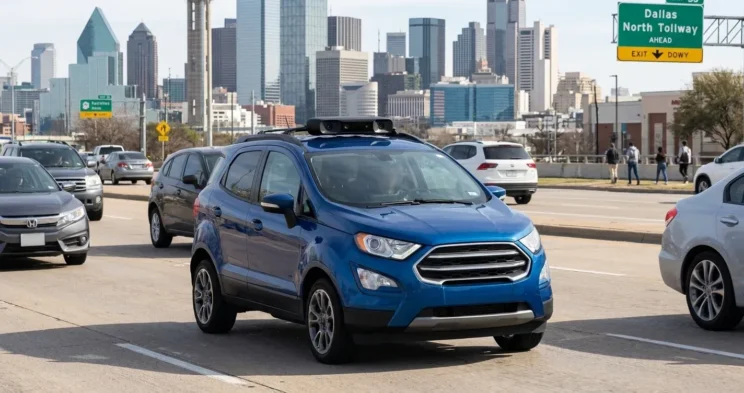
You downloaded the Waymo One app after driverless rides launched in Dallas, and you’re staring at a waitlist screen. Access is rolling out in waves, and two people in the same building can have different availability at the same time.
This guide covers how to get access, where Waymo currently operates, and what to do if something goes wrong.
What Waymo’s Dallas Launch Means for Riders
Waymo began offering limited public rides in Dallas on February 24, 2026. The key word is “limited.” Access is rolling out through the Waymo One app in waves, with broader availability expected later in 2026.
The service area is also geo-fenced. Waymo vehicles operate within specific boundaries that can shift as the company expands. Weather, construction, and special events near Downtown or along the Dallas North Tollway corridor can temporarily affect availability too.
How to Get Access to Waymo in Dallas
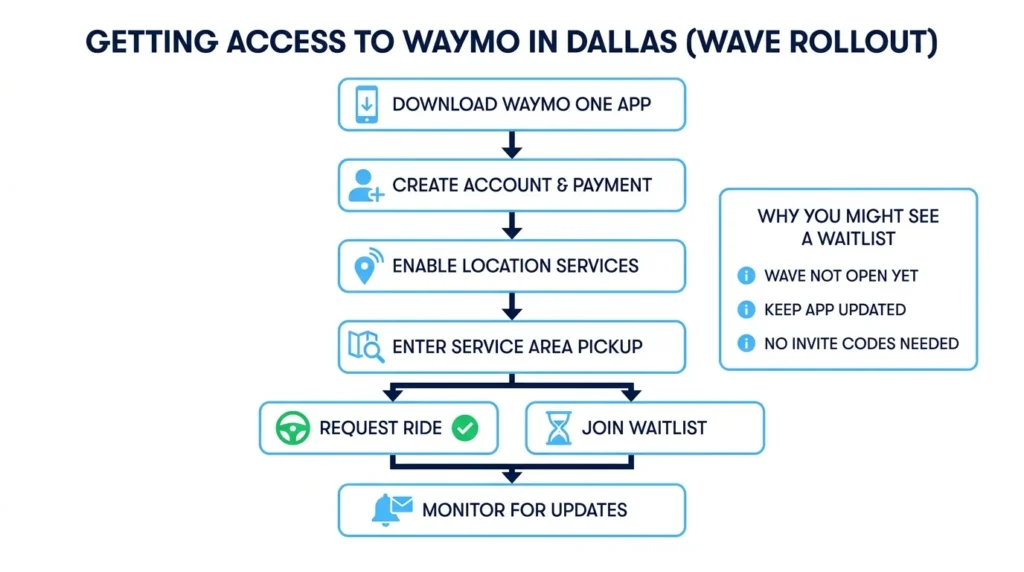
The Waymo One app is your only path to requesting rides. Here’s the process:
- Download the Waymo One app from the App Store or Google Play
- Create an account with your email and payment information
- Check Dallas availability by entering a pickup location in the service area
- Follow any waitlist or invite prompts if rides aren’t available yet
If the app shows Dallas isn’t available to you, that doesn’t mean you did something wrong. It means your wave hasn’t opened yet. Keep location services enabled, update the app regularly, and watch for email notifications from Waymo.
Do You Need a Waymo Dallas Invite Code?
Riders often describe the rollout as “invite-only” or ask about codes. The reality is simpler. Access is controlled through the app itself. When your wave opens, you’ll see the option to request rides. There’s no separate code to enter.
Be cautious about anyone claiming to sell or share invite codes. Legitimate access updates come directly from the Waymo One app or official Waymo communications. Don’t share sensitive account information with third parties.
What Areas of Dallas Does Waymo Serve Right Now?
Local reporting indicates the initial service footprint is Downtown-oriented, extending toward areas like Highland Park, Lower Greenville, and Bishop Arts District. But boundaries can change.
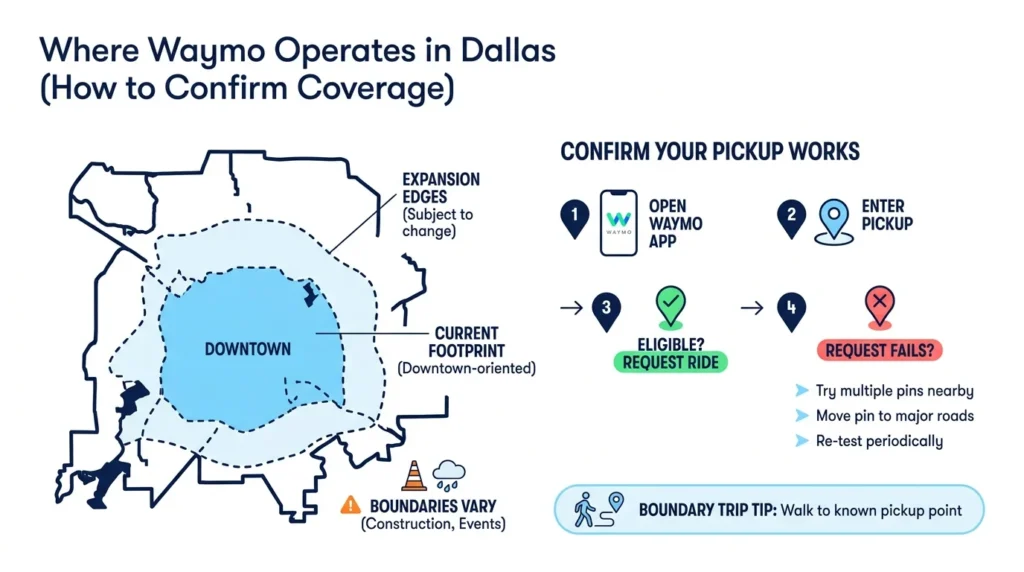
The most reliable way to confirm coverage is testing pickup locations directly in the app. Enter your address or a nearby intersection. If the app allows you to request a ride, you’re inside the current service area.
If a request fails, try these steps:
- Test multiple pickup pins within a few blocks
- Move your pin closer to major roads like Preston Rd. or Greenville Ave.
- Check different times of day
- Re-test periodically as waves expand
Planning a trip to or from a boundary area? Identify a known-available pickup point and plan a short walk if needed. This is especially useful near the edges of the service zone in neighborhoods like Uptown or near Love Field.
Before You Ride: A Safety Checklist
Taking a few precautions before you request a ride can prevent problems later.
At Pickup
Confirm the vehicle matches what the app shows before entering. Choose well-lit pickup spots away from active traffic lanes. Avoid stopping in busy corridors near I-35E or Loop 12 during rush hour.
During Boarding
Stand in a safe spot until the vehicle comes to a complete stop. Enter quickly and buckle up immediately. Keep doors closed until everyone is seated to avoid dooring incidents.
If something looks off at pickup, cancel and reposition rather than forcing it. A safer pickup point is worth the extra minute. For more context on high-risk areas, see our breakdown of the most dangerous roads in Dallas.
During the Ride: What You Can Do
Driverless rides can feel unfamiliar. The vehicle may stop unexpectedly, take a cautious route, or reroute around construction near Downtown or along US-75. These behaviors are typically safety features, not malfunctions.
If you feel unsafe or need assistance, the app includes support options. Use them. If there’s an immediate emergency, call 911.
For near-misses or close calls, note the time, location, and what you observed while it’s fresh. Report through the app and keep confirmation of your report. Take photos of the scene if it’s safe to do so.
Even if nothing happened to you, documenting close calls creates a record that could matter later.
If There’s a Crash: What to Do Immediately
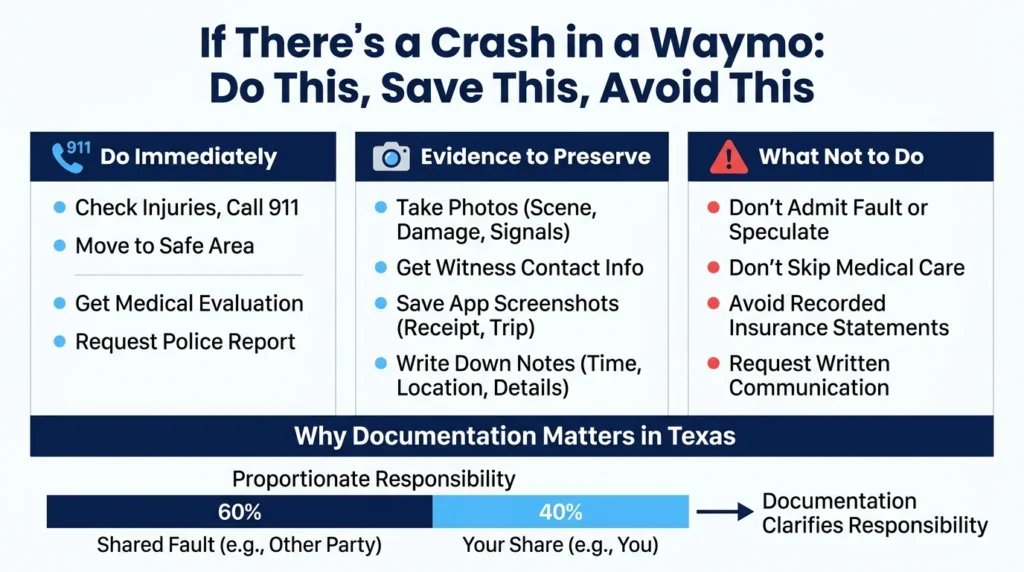
A collision involving any vehicle requires the same basic response. Being in a driverless car doesn’t change the fundamentals.
First Steps
Check for injuries and call 911 if anyone is hurt. Move to a safe area if possible. Request medical evaluation even if symptoms seem minor. Get a police report with the responding agency’s information.
Evidence to Preserve
- Photos of all vehicles, damage, traffic signals, and the surrounding area
- Contact information for any witnesses
- Screenshots of your ride receipt and trip details from the Waymo app
- Notes about the time, location, and what happened
Delayed symptoms like neck pain or headaches are common after car accidents. Don’t assume you’re fine just because you feel okay at the scene.
What Not to Do at the Scene
Don’t admit fault or speculate about what caused the crash. Stick to facts when speaking with police or other parties. Don’t skip medical care if you’re hurt. And don’t provide recorded statements to insurance adjusters without understanding what they’re asking for.
If an insurer contacts you quickly after an incident, remember: insurance companies are businesses. Their goal is to resolve claims for the lowest possible payout. You’re not required to give a recorded statement on the spot. Consider speaking with an attorney first, especially if injuries are involved.
Texas Self-Driving Car Rules & Liability Basics
Texas law addresses automated motor vehicle operation under Texas Transportation Code Chapter 545. The statute establishes frameworks for how these vehicles can operate and who may be considered the “operator” for purposes of traffic laws.
After a crash involving a driverless vehicle, multiple parties could potentially share responsibility depending on the facts: another driver, the company operating the vehicle, maintenance providers, or others. Texas doesn’t automatically assign fault to one party.
Texas also follows proportionate responsibility rules under Texas Civil Practice and Remedies Code § 33.001. This means fault can be divided among everyone involved based on their percentage of responsibility.
For example, if another driver ran a red light near Preston Hollow and struck the Waymo vehicle you were riding in, that driver would likely bear most of the fault. But if multiple vehicles were involved, fault gets allocated based on evidence: police reports, witness statements, photos, and data from the vehicles themselves.
This is why preserving evidence matters. The stronger your documentation, the clearer the picture of what happened and who’s responsible.
Insurance Basics for Waymo-Related Incidents
Texas requires all motor vehicles to carry financial responsibility under Texas Transportation Code Chapter 601. This applies to commercial operations as well.
If you’re injured as a Waymo passenger, the claims process will depend on which vehicles and parties were involved. You may be dealing with multiple insurance policies: the at-fault driver’s coverage, commercial policies covering the Waymo vehicle, or your own insurance.
Documentation to keep:
- Medical visit records and bills
- Missed work documentation
- Ride receipts and app screenshots
- All correspondence with insurers
- Claim numbers and adjuster names
When reporting a crash to insurance, provide factual basics only: date, time, location, parties involved, and police report status. Avoid guessing about fault before evidence is collected. Ask for everything in writing.
For more on how rideshare-style incidents differ from traditional crashes, see our guide on what to do after a rideshare accident in Texas.
When to Talk to a Dallas Accident Lawyer
Not every fender-bender needs legal help. But certain situations warrant a conversation with an attorney:
- You went to the ER or have ongoing medical treatment
- There’s a dispute about who caused the crash
- Multiple vehicles or a pedestrian or cyclist were involved
- An insurer is pushing for a quick settlement before you understand your injuries
- You’re unsure which insurance policies apply
An experienced firm can help gather evidence, coordinate medical records, identify all potentially responsible parties, and handle communications with insurers so you can focus on recovery.
At Angel Reyes & Associates, we’ve spent over 30 years helping injured Texans. We offer free consultations, and you pay nothing unless we win. With more than 20 offices across Texas and the ability to handle most of your case remotely, we’re here when you need us. Contact us to discuss your options.
Waymo in Dallas FAQs
Can a minor ride in a Waymo alone in Dallas?
Waymo’s rider rules can change by market and account type, so check the current in-app terms before booking. In many ride services, minors riding alone are restricted unless the platform specifically allows it.
What should I do if I leave something behind in a Waymo?
Use the app’s trip history or support tools as soon as you notice the item is missing. Acting quickly usually gives you the best chance of recovering phones, wallets, keys, or bags.
Will weather affect Waymo availability in Dallas?
Yes. Heavy rain, low visibility, road closures, or other unsafe conditions can reduce service, change pickup points, or make rides temporarily unavailable.
Can I use my own car seat in a Waymo?
In Texas, children generally still need to be secured under the state’s child passenger safety rules, even in a driverless ride. If a child needs a car seat or booster, plan to bring and install the right one unless the service clearly says otherwise.
If I get hurt as a passenger, should I tell my own auto insurer too?
Often yes, especially if medical payments coverage, personal injury protection, or uninsured/underinsured motorist coverage might apply to your situation. Reporting promptly can help protect potential benefits while fault is still being sorted out.
About the Authors

Angel Reyes
Writer
Angel L. Reyes, III is the Founder and Managing Partner of Angel Reyes & Associates. A nationally recognized trial attorney and business leader, Angel has helped over 70,000 injury victims recover more than $1 billion since founding the firm in 1993. Named to the Texas Super Lawyers list annually since 2008, Angel brings Wall Street experience, Ivy League education, and a deep commitment to client advocacy. He is a frequent legal commentator and published author with extensive contributions to legal scholarship, trial strategy, and consumer protection.

Graham Griffin
Editor
Graham Griffin is the Web & Content Manager at Angel Reyes & Associates, where he oversees content strategy, AI-powered workflows, a...

Angel Reyes
Reviewer
Angel L. Reyes, III is the Founder and Managing Partner of Angel Reyes & Associates. A nationally recognized trial attorney and business...