How to Use Rideshare Accident Evidence to Protect Your Claim


Every article on this site is researched by our internal team, reviewed for legal accuracy against current Texas law, and held to State Bar of Texas advertising standards before publication. We do not publish content that overstates outcomes or makes promises about results.
Learn more about our
editorial standards .
Key Takeaways
- App screenshots of the active trip, route map, and driver profile only exist in rideshare crashes.
- Texas law ties your available coverage to the driver's app status at the moment of impact.
- You have two years to file, but rideshare platform data can disappear within days of the crash.
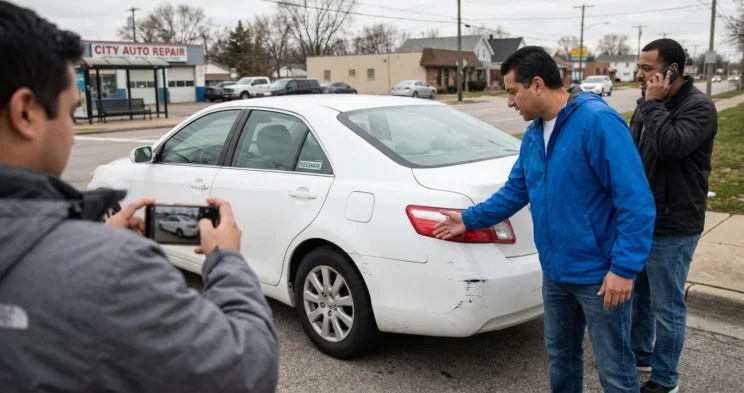
You ordered a ride through the app, got in, and the next thing you knew there was a crash on the Westheimer Road corridor near Montrose. Now you are sitting on the curb in Houston wondering what to do. You have already taken a few photos of the damage.
That is a good start, but rideshare accidents produce evidence that standard car crashes never do, and most of it lives inside your phone right now.
Why Rideshare Evidence Is Different
A rideshare crash is not like a collision between two private drivers. The moment you open the Uber or Lyft app, a digital record starts building: GPS coordinates, trip timing, driver identity, coverage period status. None of that exists in an ordinary traffic accident.
That digital record determines something specific: which insurance policy applies and at what limits.
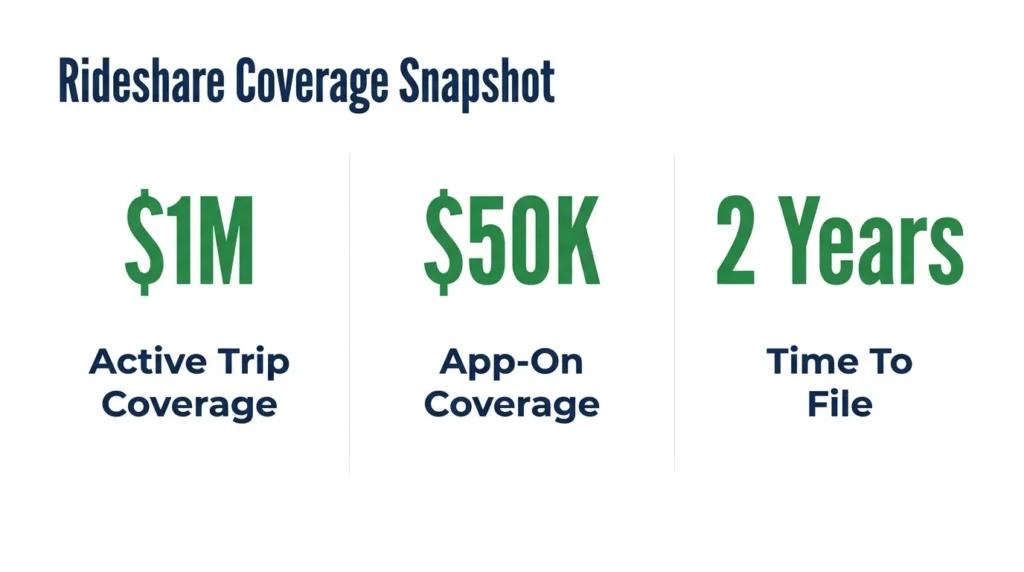
Under Texas Insurance Code Chapter 1954, the coverage available to you depends entirely on what the driver’s app was showing at the moment of impact. If the driver had accepted your ride and was en route or actively transporting you, the TNC’s $1,000,000 primary liability policy applies. If the app was on but no ride had been accepted, a much lower contingent limit of $50,000 per person applies instead.
That single data point can be worth hundreds of thousands of dollars. It also disappears. Platform data does not live forever, and some GPS event logs face routine deletion on short cycles. There are also several coverage periods that work in Texas rideshare claims.
App Data to Screenshot Right Now
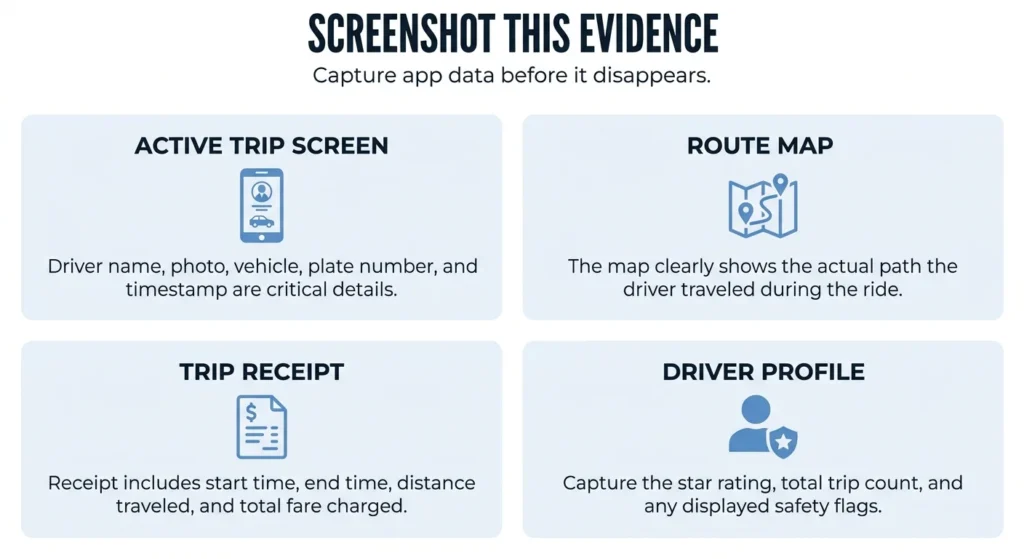
The most important thing you can do at the scene, or within the first hour, is capture what the app is already showing you. Before you close the app or let the ride process to completion, take screenshots of each of the following.
- Step 1: Screenshot the active trip screen. This captures the driver’s name, photo, vehicle make, vehicle model, and license plate number. It also timestamps your ride with a record the app generated, not something you typed in later.
- Step 2: Screenshot the route map. The map shows the path the driver actually traveled. If the driver did not take the expected route, this record documents it. Route deviation can become relevant if the crash happened in an area the trip should never have reached.
- Step 3: Screenshot the trip receipt. The receipt arrives after the ride completes and shows the exact start time, end time, distance, fare, and driver rating at the time of the trip. This is your primary proof that the ride was active, which connects directly to the coverage period.
- Step 4: Screenshot the driver’s profile. The profile shows the driver’s overall star rating, total trip count, and any compliment badges or tags. A pattern of low ratings or recent safety complaints can support an argument that the company failed to monitor driver conduct.
Standard Scene Evidence Still Applies
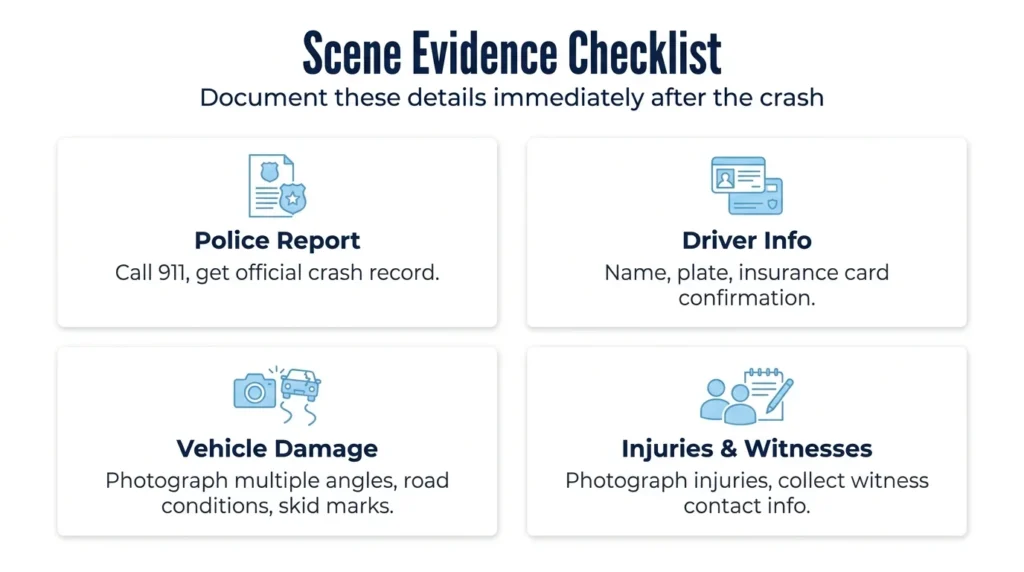
App screenshots do not replace the documentation that applies to any crash. You still need the same evidence a standard car accident claim requires:
- Call 911 and wait for a police report. The report creates an official record of the crash, confirms the parties involved, and is one of the first documents an insurance adjuster will request.
- Get the Uber or Lyft driver’s name, license plate, and any insurance card information they carry, even though the app already shows some of this. Physical confirmation that the plate matches the app prevents a driver from later claiming they were not on duty.
- Photograph the vehicle damage from multiple angles, including close-ups and wide shots that show the road context. Document skid marks, traffic signals, and any road conditions that may have contributed.
- Photograph your injuries as soon as possible. Collect names and phone numbers from any witnesses before they leave the scene.
Platform Data Your Attorney Can Recover
Beyond what you can screenshot, both Uber and Lyft maintain internal records that passengers cannot access on their own. These include GPS telemetry logs that track the vehicle’s speed at specific points along the route, driver acceptance and cancellation history, in-app event flags triggered during the trip, and platform safety records that are never shown to riders.
An attorney can send a formal preservation letter to Uber or Lyft demanding that this data be retained before routine deletion occurs. This letter puts the company on legal notice. Without it, the company has no obligation to hold data outside its normal retention schedule.
A personal injury attorney familiar with Texas rideshare accident claims can send this demand within days of you retaining them.
Driver safety records and background check data can also be obtained through formal discovery once a lawsuit is filed. These records are not visible to passengers but can establish whether the company knew about prior safety issues with a specific driver.
How Evidence Connects to Your Claim
Every piece of evidence you collect connects to a specific part of your claim. Your app screenshots and trip receipt prove which coverage period was active under Texas Insurance Code Chapter 1954 at the moment of impact. Without that proof, the rideshare company’s insurer may dispute the period and attempt to apply the lower limit.
Your photos of vehicle damage and your injuries document the severity of harm and support your medical bills, lost wages, and pain and suffering calculations. Witness accounts establish what other people observed, which matters when the driver tells a different story. The police report ties it all together with an independent official record.
Texas gives you two years from the date of the crash to file a personal injury lawsuit under the Texas Civil Practice and Remedies Code (CPRC) § 16.003. That window starts immediately. A thorough evidence record collected in the days and weeks after the crash gives your attorney the strongest possible foundation well before that deadline arrives.
Get Legal Help Before Evidence Disappears
Rideshare accident claims move fast because the evidence does. App data can be deleted, platform logs can be overwritten, and surveillance footage from nearby businesses is typically gone within 24 to 72 hours.
Angel Reyes & Associates has guided injured Texans through personal injury claims for over 30 years, including rideshare cases where the digital evidence was the deciding factor. We work on contingency, so there is no fee unless we win your case.
If you were hurt in an Uber or Lyft crash, contact us for a free consultation before the clock runs out on your evidence and your claim.
Past results do not guarantee future outcomes.
Rideshare Accident Evidence FAQs
Can I request a copy of my Uber or Lyft trip data directly from the platform?
Yes. Uber lets you submit a personal data request through the Privacy Center in your account settings, and the platform will email you a download link within 48 hours. Lyft has a similar data request process through its Help Center, though the data you receive may not include internal event logs that only an attorney can access through formal discovery.
What if I was a third-party driver or pedestrian hit by a rideshare vehicle, not a passenger?
You are still entitled to pursue a claim against the rideshare company’s commercial policy if the driver was on an active trip or en route to a pickup at the time of the crash. Document the rideshare decal on the vehicle, photograph the driver’s app screen if safely visible, and request the police report, which should note the driver’s rideshare status.
Does it matter if I was using Uber versus Lyft for evidence purposes?
The types of evidence you need are the same for both platforms. Both Uber and Lyft use the same coverage period framework under Texas law and both use internal GPS and trip logs that can be preserved through an attorney’s preservation demand. The main practical difference is that each company uses different insurance carriers and has a slightly different in-app accident reporting tool.
What if the Uber or Lyft driver had just canceled a trip right before the crash happened?
App status at the exact moment of impact controls coverage, not what the driver was doing in the minutes before. If the driver canceled and was in Period 1 (app on, no active ride) when the crash occurred, the lower contingent coverage limits apply. Your attorney can subpoena platform logs showing the precise app status timeline leading up to and including the moment of the crash.
Should I report the accident through the rideshare app in addition to calling 911?
Yes. Both Uber and Lyft have in-app safety reporting tools, and filing a report through the platform creates a timestamped record within their system. This internal report can later be obtained through discovery and may document details the driver or company recorded at the time. Filing a platform report does not replace calling 911 or getting an independent police report.
About the Authors

Angel Reyes
Writer
Angel L. Reyes, III is the Founder and Managing Partner of Angel Reyes & Associates. A nationally recognized trial attorney and business leader, Angel has helped over 70,000 injury victims recover more than $1 billion since founding the firm in 1993. Named to the Texas Super Lawyers list annually since 2008, Angel brings Wall Street experience, Ivy League education, and a deep commitment to client advocacy. He is a frequent legal commentator and published author with extensive contributions to legal scholarship, trial strategy, and consumer protection.

Kyle Nicolas
Editor
Kyle Nicolas is the Web Content & SEO Manager at Angel Reyes & Associates. He has more than 10 years of experience as a marketing co...

Angel Reyes
Reviewer
Angel L. Reyes, III is the Founder and Managing Partner of Angel Reyes & Associates. A nationally recognized trial attorney and business...