How Dashcam Footage Helps Prove Your Rideshare Accident Case


Every article on this site is researched by our internal team, reviewed for legal accuracy against current Texas law, and held to State Bar of Texas advertising standards before publication. We do not publish content that overstates outcomes or makes promises about results.
Learn more about our
editorial standards .
Key Takeaways
- Dashcam footage can provide hard evidence of how a rideshare accident took place.
- Driver dashcams often overwrite within 24 to 72 hours, so footage must be saved fast.
- Dashcam footage must be authenticated before it may be used as evidence.
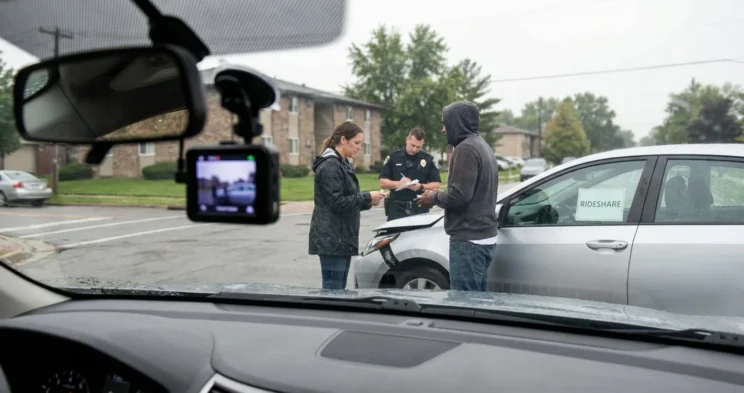
You were riding through Midtown on a Friday night when your Uber driver got T-boned at a light off Westheimer Road. You are hurt, the other driver is blaming your Uber driver, and you remember seeing a small camera mounted on the windshield. That footage could decide your entire rideshare accident claim.
How Dashcam Footage Impacts Rideshare Claims
Dashcam video can be used as evidence in a personal injury claim. It can place a rideshare driver on an active trip at the exact moment of the crash. That single fact often decides which insurance coverage responds to your claim, because Uber and Lyft coverage shifts depending on whether the driver was logged in, waiting, or carrying a passenger.
The footage also documents how the driver was actually moving. Speed, lane position, and signs of distraction can be clearly captured on video, proof that is often more substantial than claims made in a police report.
Rideshare crashes involve massive tech companies with deep digital tracking networks. Uber and Lyft keep detailed GPS logs and app activity records, which are frequently verified or disproven by dashcam footage.
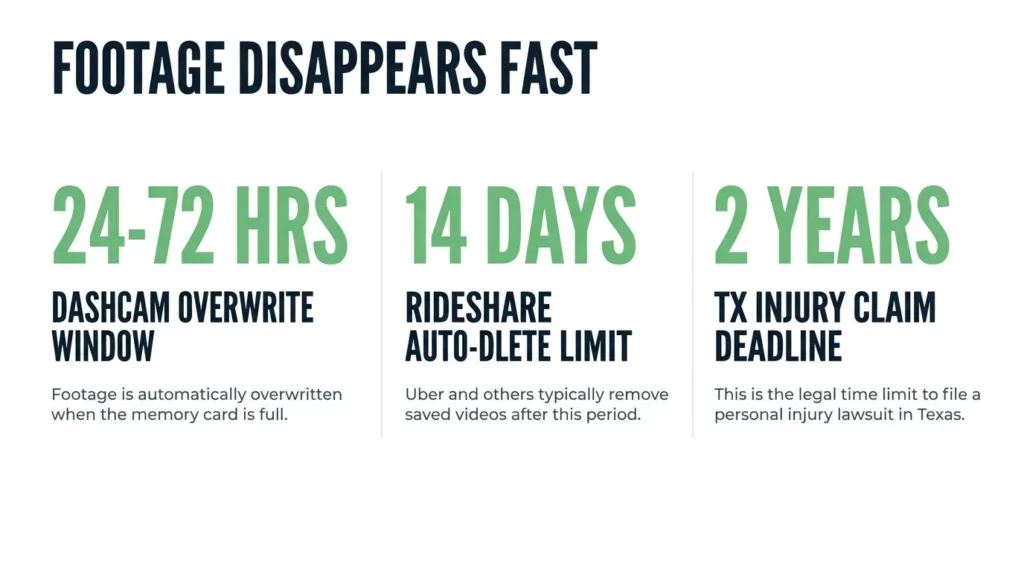
Dashcam footage can be difficult to obtain if you don’t act quickly. Many driver dashcams overwrite their footage within 24 to 72 hours, and Uber’s Record My Ride recordings auto-delete after 14 days.
Two Sources of Dashcam Footage
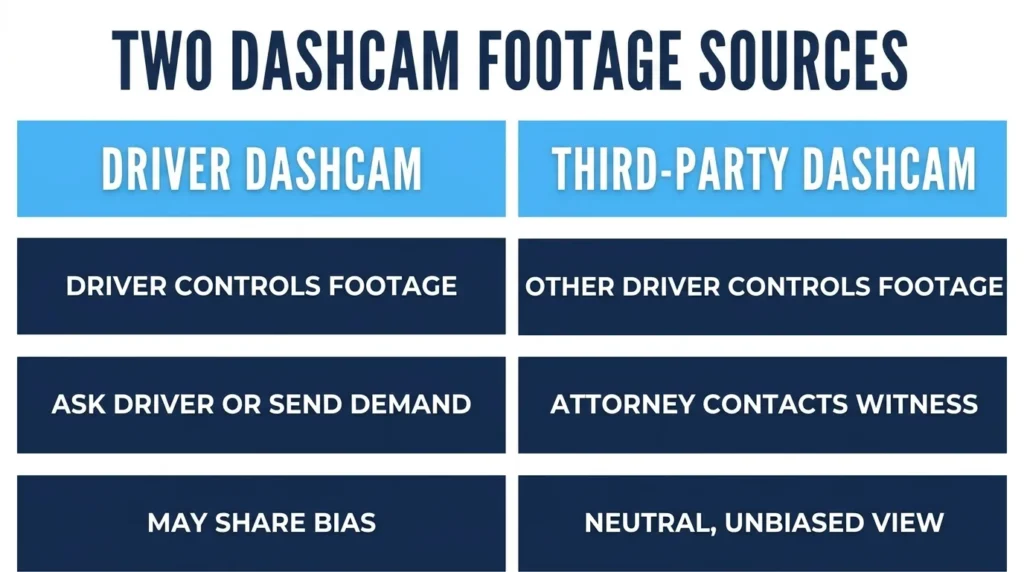
In a rideshare crash, video footage usually comes from two different sources—and a different person controls each one. Knowing exactly who holds the recording tells your attorney who to contact and how fast you need to act before it is deleted.
Driver-Installed Dashcams
A driver-installed dashcam is the driver’s personal hardware, mounted on the windshield or dash, and the driver controls the SD card or cloud upload.
There are two ways you can get dashcam footage from an Uber accident. You can make a verbal or written request to the driver at the scene, or your attorney can send a formal preservation demand through the driver’s insurer.
According to Lyft’s safety policies, driver dashcams must be visibly disclosed and in compliance with local laws. Drivers may only share their dashcam footage with law enforcement or Lyft’s Trust and Safety team after an incident report has been filed.
Third-Party Cameras
Other vehicles driving near the crash site are often equipped with their own dashcams. Because these drivers have no financial stake in your lawsuit, their footage provides an entirely unbiased, neutral perspective that can easily confirm exactly how the crash happened.
Preserve Dashcam Footage Before It Is Overwritten
Under Texas Civil Practice and Remedies Code (CPRC) § 16.003, you have a two-year window to file a personal injury claim—but the dashcam evidence needed to win that claim can vanish in less than 24 hours. While the legal deadline gives you plenty of time, the technology does not; you must act immediately to lock down the footage before the camera’s memory card overwrites it.
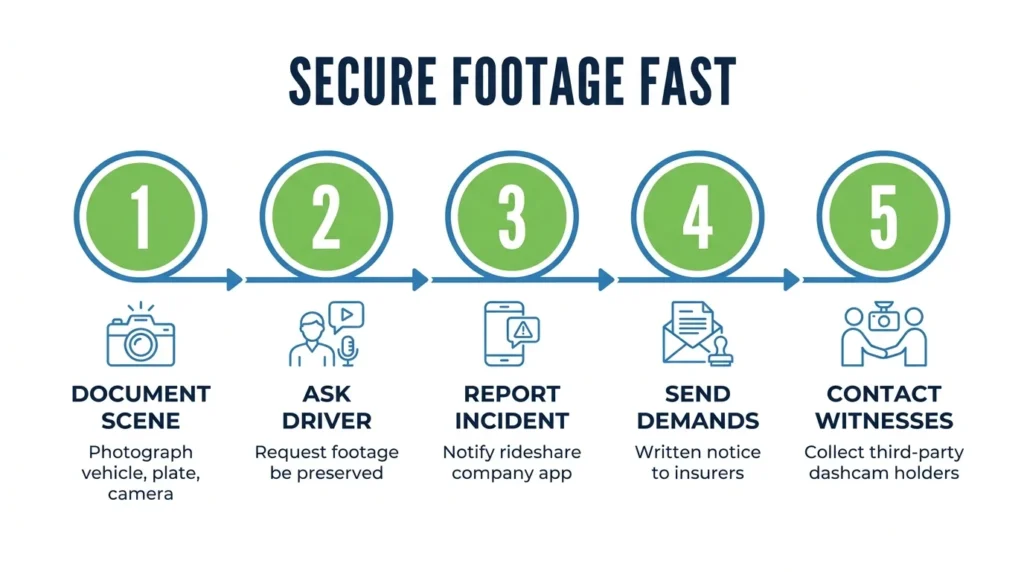
Here is how to secure footage immediately after a rideshare collision:
- Step 1: Document the scene. Photograph the driver’s vehicle, license plate, dashcam unit, and any visible camera mounts before you leave.
- Step 2: Ask the driver to preserve the footage. Request in writing that they not delete, overwrite, or transfer it. A simple text message to the driver is enough to create a record.
- Step 3: Report the incident through the app. Notify Uber or Lyft within hours to trigger the platform’s data retention process.
- Step 4: Send written preservation demands. Get demands to the driver’s personal insurer and to Uber or Lyft’s claims department by the next business day.
- Step 5: Reach the third-party camera holders. Collect the names and phone numbers of witnesses at the scene who have dashcams and may have captured the accident. Your attorney can follow up with them to request a copy of the video file.
A spoliation demand puts the driver and the platform on legal notice that they must keep the evidence. If they fail to preserve it after a formal demand, that failure can support a spoliation inference at trial.
An attorney can send these preservation demands for you, which carries more legal weight than a personal request and builds a clear paper trail.
Authenticating Footage Under Texas Rules of Evidence
According to Texas Rules of Evidence Rule 901, you must formally “authenticate” dashcam footage before a court will accept it as evidence. This simply means you have to prove the video is real, accurate, and unedited. You can do this through a clear log of who handled the recording, testimony from someone who witnessed the crash, or the video’s digital file data.
Why You Must Protect the Original File’s Metadata
Every original dashcam video contains hidden digital information called metadata. This metadata embeds exact timestamps, dates, and GPS coordinates directly into the file.
This hidden data is the easiest way to prove your video is authentic. However, simple mistakes, such as copying the video incorrectly, texting it to someone, or running it through file-compression software, can permanently strip the metadata away.
Because of this, you should always preserve the original, unedited raw file directly from the camera’s SD card to keep its digital fingerprint intact.
Get Help Securing Evidence After a Rideshare Crash
Dashcam footage can prove what happened in your car accident, but only if someone moves fast enough to save it. That is where we come in.
Angel Reyes & Associates has handled Texas rideshare injury cases for over 30 years, with more than $1 billion recovered for our clients. We offer free initial consultations, charge no fees unless we win, and are available 24/7 to discuss your case.
If you need help preserving dashcam footage or building a rideshare accident claim, contact us for a free consultation so we can act before the evidence disappears.
Dashcam Footage FAQs
Are Uber and Lyft drivers required to have dashcams?
Neither Uber nor Lyft requires drivers to install dashcams. Both platforms allow drivers to use them voluntarily, subject to local disclosure laws, but there is no platform-wide mandate.
What happens if the driver refuses to share dashcam footage voluntarily?
Footage can be compelled through a subpoena or court order once litigation begins. If the driver deletes footage after receiving a written preservation demand, that destruction may support a spoliation inference at trial, meaning a jury may be permitted to assume the missing footage would have been harmful to the driver’s case.
Can dashcam footage work against a rideshare accident claim?
Yes. If footage from any camera at the scene shows the injured party was not wearing a seatbelt, was distracted, or contributed to the crash in any way, the other side will use it to argue a higher share of fault. Under Texas’s proportionate responsibility rules, being found more than 50 percent at fault bars recovery entirely.
Does dashcam footage change how fault is split in a Texas rideshare crash?
Texas divides fault among all parties based on their share of responsibility for the crash, and video evidence is one of the most direct ways to shift or confirm those percentages. Footage showing a driver running a red light, for example, can push that driver’s fault percentage high enough to reduce or eliminate what the injured party owes in shared responsibility.
Can cell phone video from the scene be used if dashcam footage is unavailable?
Phone video recorded by a passenger or bystander is admissible evidence in Texas, but it faces more scrutiny than dashcam footage because courts look closely at video quality, recording time, and whether the content can be authenticated. It can still support a claim, particularly when combined with other evidence like app records and witness statements.
About the Authors

Angel Reyes
Writer
Angel L. Reyes, III is the Founder and Managing Partner of Angel Reyes & Associates. A nationally recognized trial attorney and business leader, Angel has helped over 70,000 injury victims recover more than $1 billion since founding the firm in 1993. Named to the Texas Super Lawyers list annually since 2008, Angel brings Wall Street experience, Ivy League education, and a deep commitment to client advocacy. He is a frequent legal commentator and published author with extensive contributions to legal scholarship, trial strategy, and consumer protection.

Graham Griffin
Editor
Graham Griffin is the Web & Content Manager at Angel Reyes & Associates, where he oversees content strategy, AI-powered workflows, a...

Angel Reyes
Reviewer
Angel L. Reyes, III is the Founder and Managing Partner of Angel Reyes & Associates. A nationally recognized trial attorney and business...